Does a Telegram Proxy Work for Voice and Video Calls?

TelegramProxy
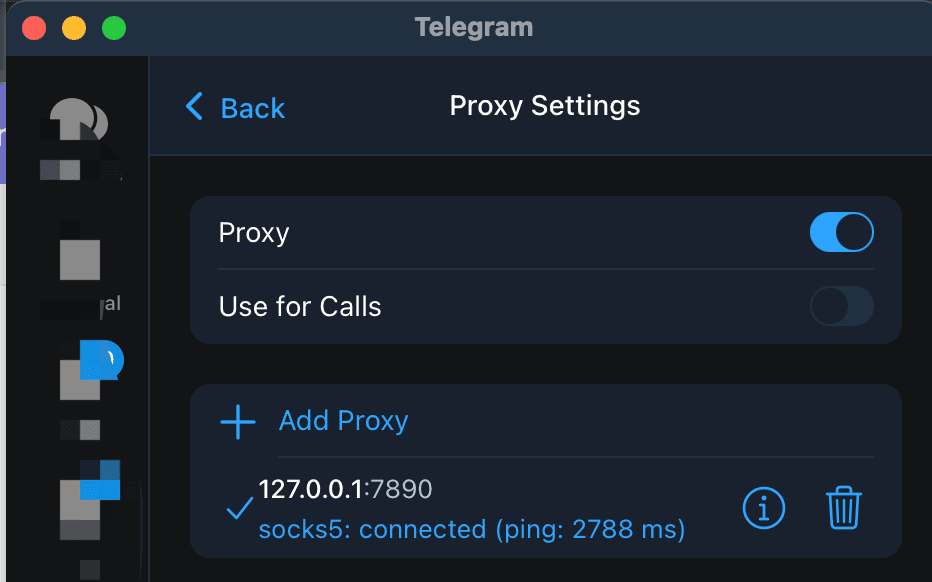
An in-app Telegram proxy may help Telegram reach its servers, but a successful chat connection does not prove that a voice or video call will work through the same route. Telegram's MTProto documentation explains app proxy settings, while its deep-link documentation lists a separate data/proxy/use-for-calls setting path. Telegram's call documentation describes signaling and WebRTC transport, so calls have additional network requirements. Open Telegram's proxy settings, check for the call option, and test one short call on the same Wi-Fi or mobile connection. If chats work but calls fail, compare the call with the option enabled and disabled, then test the same endpoint on a second network. This result describes one device, client, network, proxy, and test time. A directory's Online label does not measure call quality or WebRTC reachability. Use a trusted network-level route when the app proxy is insufficient.
Can a Telegram proxy carry voice or video calls?
Telegram's official MTProto page documents proxy support for its mobile and desktop apps. It does not promise that every proxy endpoint will carry stable voice or video calls. Telegram's call documentation describes signaling through Telegram and a WebRTC transport that can use a direct path or relay servers. A chat that syncs through an MTProto proxy therefore tells you that one part of the Telegram connection works. It does not establish a call, measure audio quality, or confirm that video packets will keep moving.
The call result can change with the client, endpoint, network, and test time. Keep those variables visible when you test. A proxy that is useful for messages may still be a poor choice for calls because of delay, packet loss, route changes, or endpoint load.
Where is the proxy setting for calls?
Telegram's documented proxy paths are:
| Client | Proxy settings path | | --- | --- | | Android | Settings > Data and Storage > Proxy Settings | | iPhone or iPad | Settings > Data and Storage > Proxy | | Telegram Desktop | Settings > Advanced > Connection Type | | Telegram for macOS | Settings > Data and Storage > Use Proxy |
Open the proxy page for your client and look for a call-specific control. Telegram's deep-link reference lists data/proxy/use-for-calls as a proxy settings subsection, but the official MTProto page does not give one universal label or layout for every client. If your version exposes the option, leave it enabled for the first comparison. If it does not, record that limitation instead of assuming that the normal proxy switch controls every call path.
How should you test a Telegram proxy for calls?
Use one complete proxy entry and change one variable at a time.
- Stay on the Wi-Fi or mobile network where you need Telegram calls to work. Note whether a known chat refreshes before changing the proxy.
- Choose one complete MTProto row from the free Telegram proxy list, or use an entry you already trust. Keep its server, port, and secret together. The Telegram proxy server guide explains why mixing fields from different rows invalidates the comparison.
- Add the entry in Telegram's proxy settings and confirm that the app shows it as enabled. If the client has a call-specific control, test with that control enabled first.
- Make one short voice call, then record whether it connects, whether both sides can hear audio, and whether the connection stays usable. Test video separately if video is the issue.
- Keep the endpoint unchanged and turn the call-specific proxy control off, if available. Repeat the same kind of call on the same network.
- If the results differ, test the same endpoint on a second network. Leave other VPNs, system proxies, and call settings unchanged during the first comparison.
This is a comparison for one device and time. It is not a benchmark for the proxy, its country label, or every Telegram user. Do not combine the result with a directory Online badge. TGProxyHub's directory check is a lower-level endpoint check and does not place a voice or video call.
What do common results tell you?
| Observation | What it suggests | Next check | | --- | --- | --- | | Chats and calls both fail | The endpoint, credentials, or network route may be unusable for this test | Recheck the complete entry, then compare another endpoint on the same network | | Chats work, but calls fail with the call option enabled | This proxy path, client, or network may not support the call reliably | Test the same endpoint with the call option off, then compare a second network | | Calls fail with the option both on and off | The proxy comparison does not explain the failure | Check the app's call permissions and the network's voice or video policy | | Calls work directly but fail through one proxy | The selected endpoint or route is unsuitable for calls at that time | Keep that endpoint for neither calls nor speed claims, and test another complete entry | | Calls change when you switch networks | The two network paths treat the endpoint differently | Use the network where the call is needed and test another trusted route if necessary |
These patterns narrow the next check. They do not prove that an ISP, country, or Telegram itself is responsible for the result.
Does the Online badge predict call quality?
No. An Online badge can describe a server and port check performed by the directory. It does not measure WebRTC setup, packet loss, audio delay, video stability, or call completion from your network. A recent check can also become stale before you tap Connect.
The same limit applies to a country label. It describes how a listing is grouped in the directory. It does not prove where the server is physically located or predict whether the route will support your call. Test the endpoint from the network and device where the conversation will happen.
Is a free Telegram proxy suitable for calls?
A free proxy can be useful for a short test, but calls need a steadier route than a directory status can guarantee. Public endpoints can become busy, disappear, or change their network path. Telegram also says that proxy operators are third parties and may record connection metadata, even though an MTProxy operator cannot read Telegram messages or identify the account from the encrypted traffic.
If calls matter, use an endpoint or network route you trust and can test repeatedly. A device-level VPN or another network-level route is a separate option from Telegram's in-app proxy. Telegram's own documentation explains that proxies usually reroute traffic for specific applications, while VPNs typically route and encrypt traffic for the device.
Questions about Telegram proxies and calls
Does the shield icon prove that calls will work?
No. The shield shows that Telegram has enabled a proxy route. Make a call to test call behavior separately.
Can I use a proxy for messages but not for calls?
Use the call-specific control when your Telegram client exposes it. If the control is missing, the client does not give you that comparison through its visible settings.
Will SOCKS5 work better than MTProto for calls?
There is no universal answer. Telegram supports both proxy types in its clients, but the result still depends on the complete credentials, endpoint, client, network, and call transport. Compare one complete entry at a time.
Should I choose a proxy from the same country as the person I am calling?
No. A country label is a directory grouping, not a guarantee about physical location, route quality, or call reachability. Choose a complete entry you can test from your own network.
Reference links for call behavior
- Telegram MTProto documentation: proxy types, client settings, credentials, and operator limits.
- Telegram deep links: proxy links and the
data/proxy/use-for-callssettings path. - Telegram phone calls: call signaling and transport details.
- Privacy, access, and safer setup: third-party proxy trust and metadata limits.
TelegramProxy is not affiliated with Telegram. Public proxy availability can change between checks.
Related guides
- Can a Telegram Proxy Make Downloads Faster?
A practical test for Telegram proxy download speed, including route comparisons, endpoint checks, and limits that a proxy cannot remove.
- Telegram Proxy for Bots: App Proxy vs Bot API
Learn whether Telegram's in-app proxy changes a bot's API connection, how to route each layer, and how to test the failing path.
- Telegram Proxy Keeps Disconnecting? Fix Auto-Switch and Network Problems
What to check when Telegram connects to a proxy and then drops it, including Auto-Switch Proxies, network changes, and stale endpoints.