Telegram Proxy on iPhone: Add MTProto When a Link Does Not Open

TelegramProxy
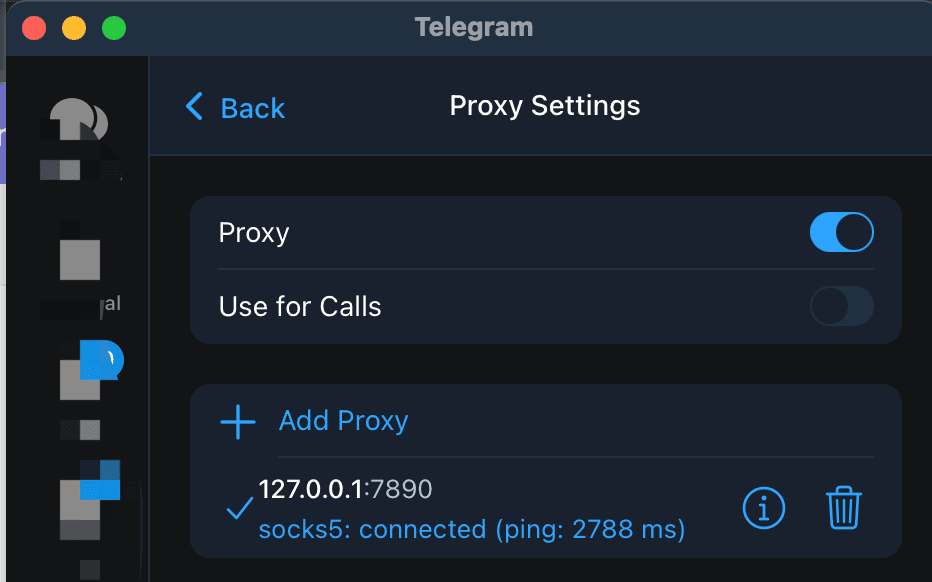
If a Telegram proxy link does not add a proxy on your iPhone, open Telegram and go to Settings > Data and Storage > Proxy. Add one complete MTProto record manually: the server, port, and secret must come from the same row in the free Telegram proxy list. Enable the proxy, return to your chat list, and check for Telegram's shield icon. Refresh a chat or send a short message on the same network where you need the connection. The site's Connect links are a shortcut for passing these values to Telegram. If the link stays in Safari or opens Telegram without saving the proxy, manual entry gives you a fallback. A directory's online label describes its own low-level check. It does not confirm that your iPhone can complete a Telegram connection. If one endpoint fails, try another row and compare Wi-Fi with mobile data before drawing conclusions about the network.
Why can a Telegram proxy link fail on iPhone?
The failure can happen before Telegram tests the server. A Connect link may open in a browser, be handed to the wrong app, or open Telegram without saving the proxy details. The endpoint can also be unavailable by the time you tap the link, or the values may have been copied from different rows.
For an MTProto proxy, Telegram requires a server, port, and secret. Telegram's official proxy documentation lists the iOS path as Settings > Data and Storage > Proxy and explains the credentials required for MTProto and SOCKS5. Use one source row for all values. A complete link from the free proxy directory is easier to pass into Telegram, while manual entry is useful when the link handoff fails.
How do you add an MTProto proxy manually on iPhone?
- Open Telegram and tap Settings.
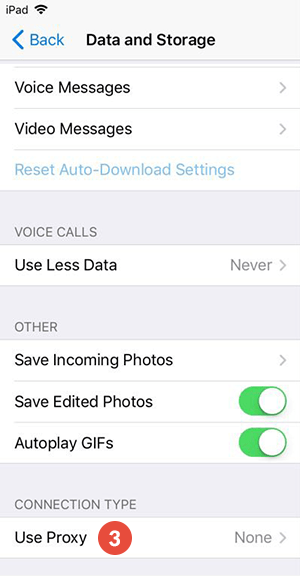
- Open Data and Storage, then Proxy. Some versions show the control as Use Proxy near the bottom of the page.
- Choose the option to add a proxy and select MTProto.
- Copy the server, port, and secret from one row in the free Telegram proxy list. Keep the three values together.
- Save the entry and enable the proxy.
- Return to your chat list and check for the shield icon that Telegram shows when a proxy is connected.
If the menu labels differ, use Telegram's official path as the reference and look for the proxy control at the bottom of Data and Storage. The project also has a platform setup guide with screenshots for iOS, Android, and Telegram Desktop.
What should you test after the proxy is saved?
Use the same endpoint for each check so that you change one variable at a time.
| What you see | Next check | | --- | --- | | The link stays in Safari | Return to Telegram and enter the server, port, and secret manually. | | The proxy saves but stays on Connecting | Recheck every character, then try another endpoint from the list. | | The shield appears but chats do not refresh | Disable a second VPN or proxy and retry the chat refresh. | | It works on mobile data but not Wi-Fi | The two networks may route or filter the endpoint differently. |
An online badge from a public directory is useful for choosing where to start. The meaningful test is whether Telegram enables the proxy and can refresh or send a message on your device. Record the endpoint, network, and date when you compare results. Public proxy records can change or go offline after a listing check.
Should you use MTProto or SOCKS5 on iPhone?
Choose MTProto when you only need to route Telegram. It uses a server, port, and secret, and Telegram supports it directly in the app. SOCKS5 uses a server and port, with an optional username and password. The official Telegram documentation describes both formats.
Neither protocol makes a public endpoint trustworthy by itself. Telegram says a proxy operator cannot read your messages or identify your Telegram account, but the operator can record the IP address connecting to the server and the fact that the connection is reaching Telegram. Read the site's privacy and safer setup guide before using a free endpoint for sensitive conversations.
FAQ
Where are proxy settings on Telegram for iPhone?
Open Settings > Data and Storage > Proxy. Telegram lists this path in its official MTProxy documentation.
What does an MTProto proxy need?
It needs a server, port, and secret. Copy all three values from the same proxy record. A server and port from one row combined with a secret from another row will not describe one usable endpoint.
Does the shield icon prove that messages will send?
The shield indicates that Telegram has connected a proxy. Refresh a chat or send a short message to check the complete path you care about. If the test fails, disable other routes, re-add the full credentials, and try another endpoint.
TelegramProxy is not affiliated with Telegram. Public proxy listings are best-effort and may be offline when you test them.
Related guides
- Telegram Proxy Not Connecting in Iran? What to Check When It Shows Online
What to check when a Telegram proxy stays on Connecting in Iran, including the difference between a TCP health check and a real Telegram connection.
- How to Set Up a Telegram Proxy on Android, iOS, Windows, Mac, and Linux
Step-by-step Telegram proxy setup instructions for Android, iOS, Windows, macOS, and Linux.
- How to Use Telegram Proxy in Russia - 2026 Guide
Learn how Telegram MTProto and SOCKS5 proxies work in Russia, how to connect safely, and what to check before trusting a public proxy.